Restore Sessions
Learn how to restore deleted Session records from the recycle bin in Training Manager Web Edition.
Overview
The restore function allows you to restore Session records that have been deleted, either accidentally or intentionally. All deleted sessions are stored in the recycle bin until they are permanently deleted or restored for use.
Prerequisites
Before restoring Sessions, ensure you have:
- Appropriate Permissions: Data Administrator or System Administrator role
- Business Justification: Valid reason for restoring the session
Step-by-Step Restoration Process
Step 1: Access the Recycle Bin
- Navigate to Sessions List: Go to the main Sessions List page
- Locate Recycle Bin Link: Look for the Recycle Bin link below the folder list
- Click Recycle Bin: Click the link to access deleted sessions
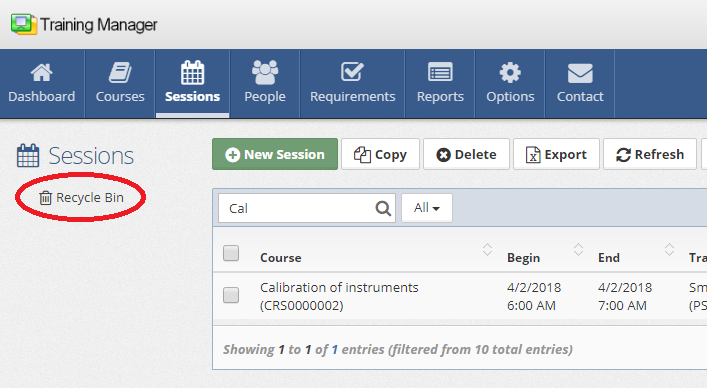
Recycle Bin Location:
- Located in the left navigation panel
The recycle bin shows deleted session records. Search using the search box, or sort the list by clicking on a column header.
Step 2: Select Sessions for Restoration
- Check Selection Boxes: Mark the checkbox next to each session to restore
- Multiple Selection: Select multiple sessions for bulk restoration if needed
- Verify Selections: Confirm you've selected the correct sessions
Step 3: Execute the Restoration
- Click Restore Selected: Use the Restore Selected button in the toolbar
- Confirm Restoration: Confirm the action when prompted by the system
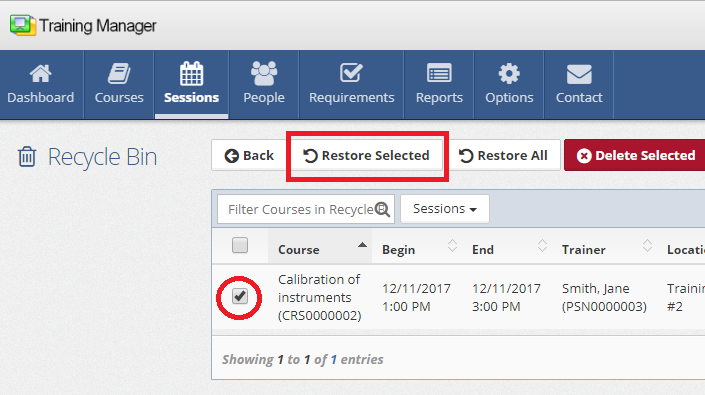
What Happens During Restoration
Data Recovery Process
Session Record Restoration:
- Session record moved from recycle bin to sessions list
- All original session data restored intact
- Original creation and modification dates preserved
Related Data Recovery:
- Student Assignments: All enrolled students restored with original settings
- Completion Records: Training status, scores, and completion dates restored
- Cost Information: Fixed costs and student costs reactivated
- Files and Documents: All uploaded files restored and accessible
- Notes and History: Complete session history and notes recovered
System Integration Updates
Training Transcripts:
- Restored sessions reappear in student training records
- Completion status updates individual transcripts
- Historical training data becomes visible again
Requirement Compliance:
- Compliance calculations automatically updated
- Overdue training status may be resolved
- Requirement dashboards reflect restored training
Reporting Integration:
- Restored sessions included in all reports
- Historical trend analysis corrected
- Cost and budget reports updated
Related Topics
- Delete Sessions - Understanding session deletion
- Edit Sessions - Modifying session information
- Add New Sessions - Creating new session records
- Session Details Reference - Complete field descriptions
- System Administration - Data management and permissions
- Dashboards & Reports - Training reporting and analytics
Session restoration is a powerful data recovery tool that ensures training records can be recovered when needed. Proper use of the recycle bin system provides confidence in data management and system reliability.