Delete Training Sessions
Learn how to remove training session records in Training Manager Web Edition.
Overview
When session records are no longer needed, you can Delete them. Deleted Session records are moved to a Recycle Bin where they can be Restored by an Administrator if needed.
After the Session record has been deleted, it is available for permanent deletion by users with System Administrator permissions. Deletion from the Recycle Bin is permanent.
When to Delete Sessions
Appropriate Deletion Scenarios
- Duplicate Records: Accidentally created duplicate sessions
- Planning Sessions: Temporary sessions created for planning purposes
- Obsolete Data: Old sessions no longer relevant for reporting
Prerequisites
Before deleting training sessions, ensure you have:
- Appropriate Permissions: Data Administrator or System Administrator role
- Business Justification: Valid reason for removing the session
- Backup Consideration: Understanding that data goes to recycle bin
- Impact Assessment: Knowledge of how deletion affects related records
Deletion Methods
Method 1: Delete from Session List
Step 1: Locate the Session
- Navigate to Sessions List: Go to the main Sessions List page
- Use Search Filter: Enter search terms in the Filter Sessions box
- Type Search Criteria: Use course title, session number, or trainer name
- Review Results: Locate the session to delete in the filtered list
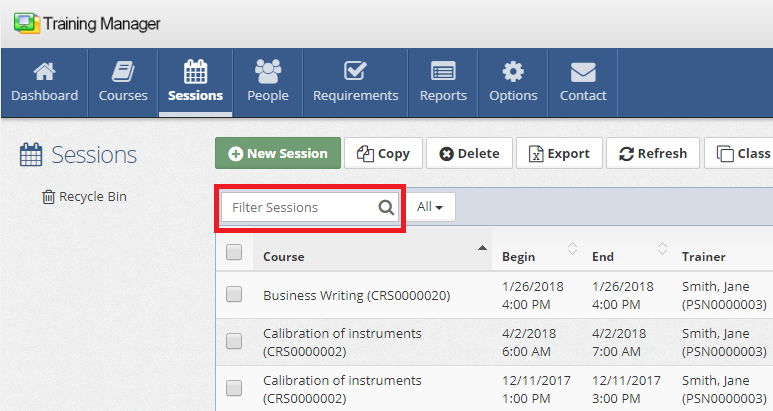
Search Tips:
- Use partial names for broader results
- Sort by date ranges if needed
Step 2: Select and Delete
- Check Session Box: Click the checkbox next to the session to delete
- Multiple Selection: Check multiple boxes to delete several sessions at once
- Click Delete Button: Use the Delete button in the Sessions List toolbar
- Confirm Deletion: Confirm the action when prompted
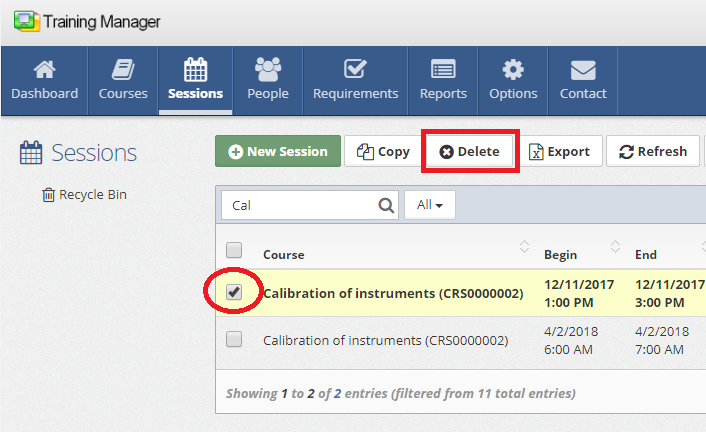
You can select multiple sessions for deletion by checking multiple boxes. This is useful for cleaning up cancelled or duplicate sessions in bulk.
Method 2: Delete from Session Details
Step 1: Open Session Details
- Click Session Row: Click on the session row to open details
- Verify Session: Confirm you have the correct session open
- Review Information: Check student assignments and completion status
Step 2: Delete from Details Page
- Click Delete: Click the button to initiate deletion
- Confirm Action: Confirm the deletion when prompted
What Happens During Deletion
Session Record:
- Moved to recycle bin
- Removed from active session lists
- Hidden from normal searches and reports
System Impact:
- Reports no longer include the deleted session
- Student transcripts may show gap in training history
- Requirement compliance calculations updated
Understanding Deletion Impact
Effects on Students
Training Transcripts:
- Completed training records from deleted sessions no longer appear in active transcripts
- May affect compliance status if session provided required training
Requirement Compliance:
- Students who completed requirements through deleted sessions show as non-compliant
- Consider alternative training records or session restoration
- Document business justification for compliance audits
Effects on Reporting
Training Reports:
- Deleted sessions excluded from training reports
- Historical trend analysis may show gaps
- Cost reports no longer include deleted session expenses
Compliance Dashboards:
- Real-time compliance status may change
- Overdue training lists may expand
- Management dashboards reflect updated status
Effects on System Data
Cost Tracking:
- Session costs removed from budget calculations
- Financial reports adjusted automatically
Recovery from Accidental Deletion
Immediate Restore
If you accidentally delete a session:
- Don't Panic: Data is in the recycle bin, not permanently lost
- Access Recycle Bin: Navigate to the sessions recycle bin immediately
- Locate Session: Find the deleted session in the recycle bin
- Restore Session: Use the restore function to recover the session and all related data. Use caution to avoid permanently deleting records.
See Restore Training Sessions for detailed instructions on:
- Accessing the recycle bin
- Locating deleted sessions
- Restoring sessions and related data
Permission Considerations
Role-Based Deletion Rights
System Administrator:
- Can delete any session
- Can permanently delete from recycle bin
- Can restore deleted sessions
Data Administrator:
- Can delete sessions
- Cannot permanently delete from recycle bin
- Can restore deleted sessions
Related Topics
- Restore Training Sessions - Recovering deleted sessions
- Edit Training Sessions - Modifying session information
- Add New Training Sessions - Creating session records
- Session Details Reference - Complete field descriptions
- System Administration - User permissions and data management
- Dashboards & Reports - Impact on training reporting
Session deletion should be used judiciously and with full understanding of the impact on training records and compliance. When in doubt, consider editing rather than deleting to preserve important historical data.