Compliance Check
The Compliance Check feature lets authorized users instantly look up an employee's training compliance by scanning their badge or entering their personnel number. Results display in seconds, showing required training status and a full training history.
What It Is
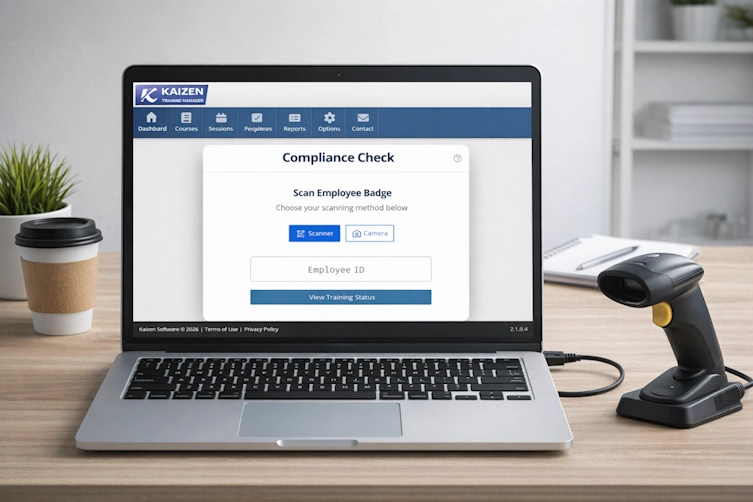
Compliance Check is a real-time badge-scan tool designed for use at workstations, entry points, safety check stations, or any location where quick training verification is needed. It is accessible from any device with a supported browser - desktop, tablet, or mobile.
Who Can Use It
Access requires a Training Manager login. What data you can view is further controlled by your data scope:
| Scope | Who You Can Look Up |
|---|---|
| Company | Any employee in the organization |
| Group | Employees within your personnel group hierarchy |
| Location | Employees within your location hierarchy |
| Direct Reports | Your direct reports and yourself |
| Individual | Yourself only |
If a personnel number exists but the employee falls outside your scope, the result will appear as "not found." This is by design to enforce data access controls.
Two Scan Modes
| Mode | Best For |
|---|---|
| Scanner Mode | USB or Bluetooth wedge barcode scanners, or manual keyboard entry |
| Camera Mode | Mobile devices or webcams scanning a badge directly with the camera |
Both modes accept the same input - the employee's personnel number or badge barcode - and display identical results. Your preferred mode is saved between sessions.
What You'll See
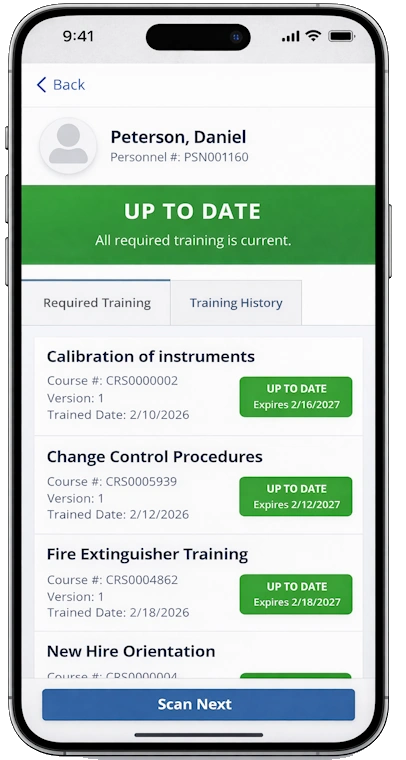
After a successful scan the training status panel shows:
- Employee name, photo, and personnel number
- Overall training status - a color-coded banner (green, yellow, or red) summarizing compliance at a glance
- Required Training - every required course with its individual status, expiration date, and days remaining
- Training History - a complete record of all training sessions including completed, enrolled, pending, and cancelled records
Navigating the Results Panel
| Action | How |
|---|---|
| Return to scan screen | Back, Close, or ESC key |
| Scan the next employee | Scan Next button |
| Android system back gesture | Closes the training panel |
Getting Started
Click the Compliance Check button on your home or dashboard page to open the feature. From there:
- Wedge scanner users → Using a Wedge Scanner
- Camera users → Using the Camera
- Understanding what's shown → Understanding Results
- Having trouble? → Troubleshooting