Using a Wedge Scanner
A keyboard wedge scanner is a physical barcode scanning device - typically USB or Bluetooth - that sends scanned data as simulated keystrokes, exactly like typing on a keyboard. No special software or drivers are required.
Supported Devices
Any keyboard-wedge barcode scanner works, including:
- USB barcode scanners (plug-and-play)
- Bluetooth barcode scanners
- Industrial badge readers that terminate with an Enter key
Getting Started
- Connect your wedge scanner (plug in USB, or pair via Bluetooth)
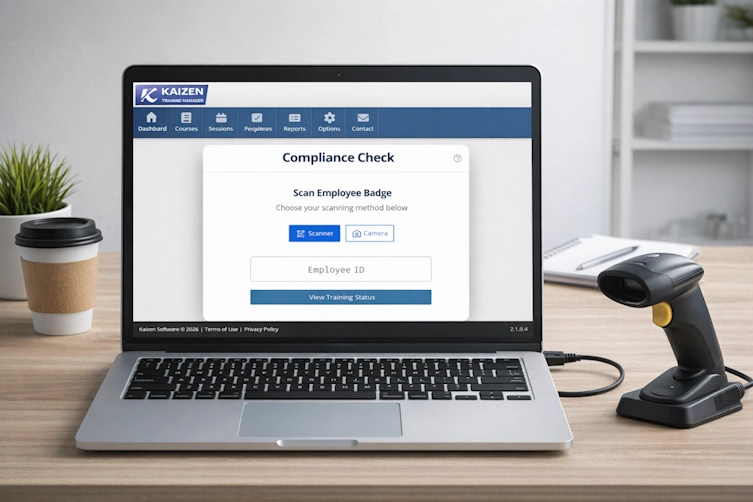
- Click the Compliance Check button on your home or dashboard page
- The page loads in Scanner Mode by default
- Point the scanner at the employee's badge barcode and pull the trigger
The lookup runs automatically - no button press is required after scanning.
Manual Entry
If no scanner is available, you can type the personnel number directly:
- Click the Employee ID input field
- Type the employee's personnel number
- Press Enter
Scan Feedback
| Feedback | Meaning |
|---|---|
| Single short vibration | Scan successful - results are displayed |
| Double vibration | Employee not found or outside your access scope |
The input field is automatically cleared after a successful scan so the page is immediately ready for the next employee.
Duplicate Scan Protection
Scanning the same personnel number twice within 2 seconds is ignored. This prevents accidental double-processing when a scanner trigger is held down or a badge is re-scanned quickly.
Switching Modes
Use the Scanner and Camera toggle buttons at the top of the Compliance Check page to switch between wedge scanner and camera modes. Your preferred mode is remembered between sessions.
Advanced: How wedge scan detection works
The application distinguishes barcode scanner input from normal typing by monitoring the speed of incoming keystrokes. Scanners emit all characters within milliseconds of each other - typically under 60 ms between keys. When this rapid-entry pattern is detected, the input is treated as a scan.
Normal typing at human speed is treated as manual entry and goes directly into the input field without triggering an automatic lookup.
An Enter key sent by the scanner immediately triggers the lookup regardless of keystroke timing. Most wedge scanners are pre-configured to send Enter as a terminator; if yours is not, refer to the scanner's programming barcode guide to enable it.