Edit Existing Requirements
Learn how to modify and update existing training requirements in Training Manager Web Edition.
Overview
Training requirements often need updates due to changing regulations, organizational policies, or operational needs. This guide shows you how to locate and edit existing requirements to keep your compliance program current.
Prerequisites
Before editing requirements, ensure you have:
- Data Administrator or System Administrator permissions
- Access to the Requirements List page
- Knowledge of which requirement needs updating
- Understanding of the impact of changes on personnel assignments
Step-by-Step Instructions
1. Locate the Requirement to Edit
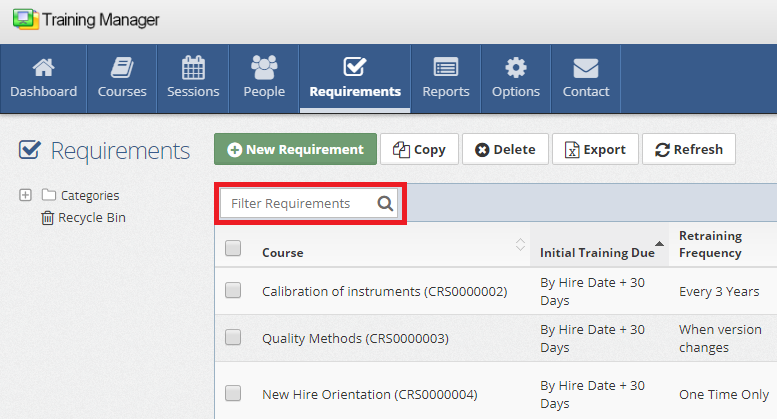
Use the search functionality to find the requirement you want to modify:
- Navigate to the Requirements List page
- Click in the "Filter Requirements" search box
- Type a few characters of the Course Title associated with the requirement
The list will automatically filter to show matching requirements.
- Search by course name for quick identification
- Use partial course titles for broader results
- Look for requirement names or descriptions
- Filter by assignment criteria if needed
2. Open the Requirement Detail Page
Once you've located the requirement:
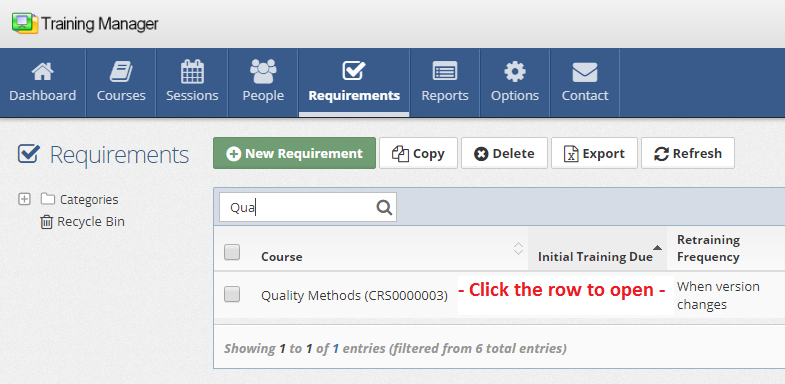
- Click on the row containing the requirement record
- This will open the Requirement Detail page where you can make changes
3. Make Your Changes
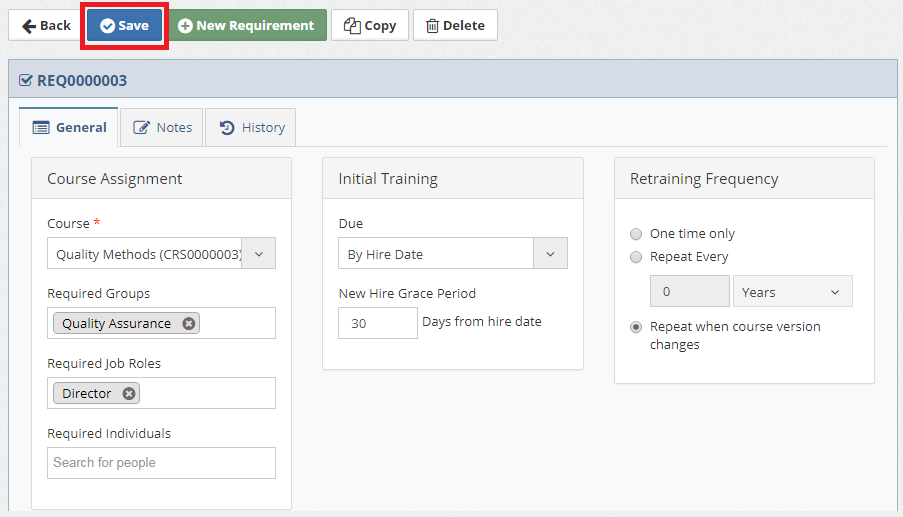
On the Requirement Detail page:
-
Modify fields as needed by typing or selecting new values
-
Update any relevant settings such as:
- Assignment rules and criteria
- Compliance timing and deadlines
- Notes and documentation
-
Click the "Save" button to save your changes
Common Editing Tasks
Assignment Rule Changes
Expanding Requirement Scope:
- Add additional roles, groups, or individuals
Narrowing Requirement Scope:
- Remove specific roles or groups from assignment
- Exclude certain group, roles, or individuals
Updating Assignment Criteria:
- Modify group assignments due to reorganization
- Update criteria based on policy changes
Course and Content Changes
Course Updates:
- Change to different but equivalent courses
Impact Assessment
Before making significant changes, consider:
Personnel Impact
Current Assignments:
- How many personnel are currently assigned this requirement?
- Will changes affect personnel already in compliance?
- Are there personnel currently working toward completion?
New Assignments:
- Will changes create new requirements for additional personnel?
- Are there personnel who will no longer need this training?
- How will changes affect new hire onboarding?
Compliance Impact
Regulatory Considerations:
- Do changes maintain regulatory compliance?
- Are there legal or industry requirements to consider?
- Will changes affect audit or certification status?
Timeline Impact:
- How do timing changes affect compliance deadlines?
- Are there operational impacts from new due dates?
- Will changes create training capacity issues?
Change Management Best Practices
Before Making Changes
Documentation:
- Document the reason for changes
- Plan communication strategy for affected personnel
Stakeholder Review:
- Consult with compliance officers
- Review with training coordinators
- Get approval from appropriate managers
Impact Analysis:
- Assess effect on current assignments
- Evaluate training capacity and scheduling
- Consider system and operational impacts
After Changes
Communication:
- Notify affected personnel of requirement changes
- Update training documentation and procedures
- Communicate new deadlines and expectations
Monitoring:
- Track compliance with updated requirements
- Monitor for any issues with assignment rules
Regulatory Updates
When regulations change:
- Update compliance requirements to match new regulations
- Modify training content requirements
- Adjust timing to meet new regulatory deadlines
Technology Changes
When systems or processes change:
- Update technical training requirements
- Modify equipment or software-specific training
- Add new technology training as needed
Next Steps
After editing requirements:
- Monitor compliance dashboards for updated requirements
- Review training schedules to ensure adequate capacity
- Communicate changes to training coordinators and supervisors
- Update related documentation and procedures
Related Topics
- Add New Requirements - Creating new training requirements
- Delete Requirements - Removing requirements from active use
- Restore Requirements - Recovering deleted requirements
- Compliance Reporting - Monitoring requirement compliance
Next: Learn how to delete requirements that are no longer needed.