Add New Requirements
Learn how to create new training requirements in Training Manager Web Edition.
Overview
Creating training requirements is essential for ensuring personnel complete necessary training based on their group, roles, or individual needs. This guide walks you through establishing new training requirements linked to specific courses.
Prerequisites
Before creating requirements, ensure you have:
- Data Administrator or System Administrator permissions
- Access to the Requirements List page
- Clear understanding of what training should be required
- Courses already created that will be linked to requirements
Step-by-Step Instructions
1. Access the New Requirement Function
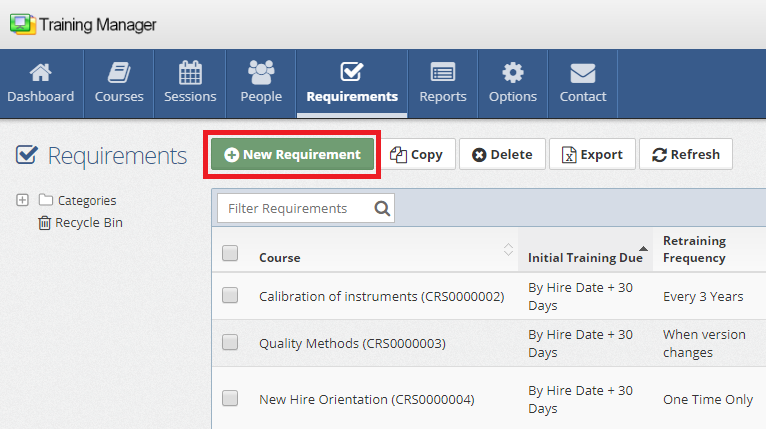
Click the "New Requirement" button, which can be found in two locations:
- Requirements List page - In the main toolbar above the requirements list
- Requirement Detail page - When viewing an existing requirement
2. Select the Required Course
On the new requirement page, the most important step is selecting which course will be required:
- Click the Course selection field
- Choose the appropriate course from the dropdown list
- Verify the correct course version if multiple versions exist
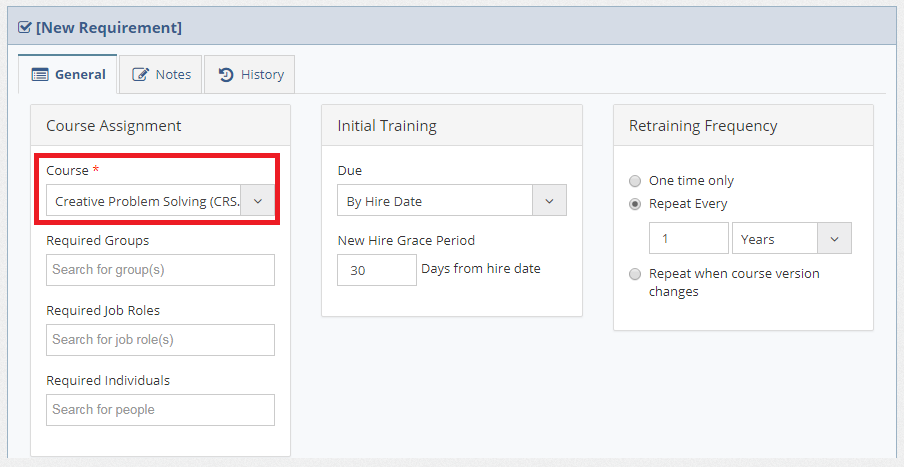
Ensure you select the correct course and version. Once personnel are assigned this requirement, they will need to complete the specified course to achieve compliance.
3. Configure Requirement Settings
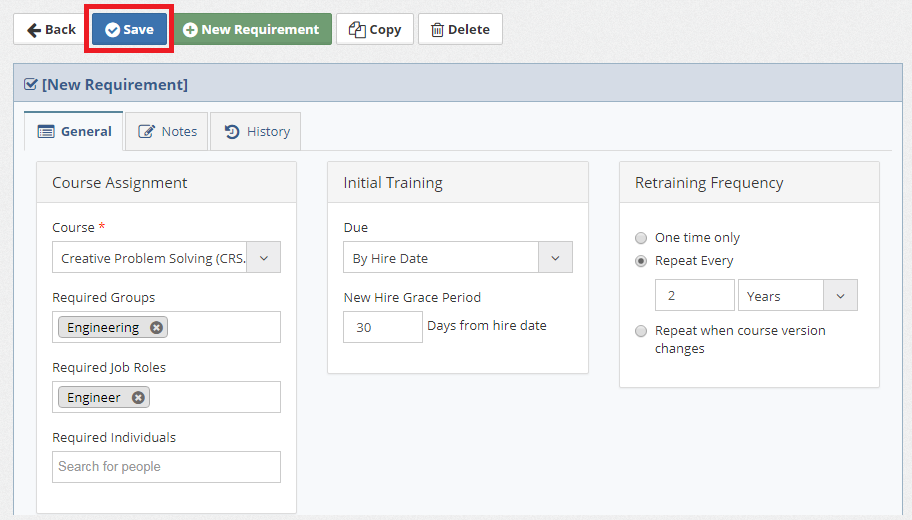
Complete additional requirement configuration fields:
Assignment Rules
- Target Audience - Define who needs this training:
- Specific groups
- Job roles
- Individual personnel
Compliance Settings
-
Initial Training - When initial training must be completed:
- Immediately upon assignment
- By Hire Date
- By a specific date
-
New Grace Period - Time allowed after hire date before training is overdue
-
Retraining Frequency - When retraining is required:
- One time only
- Every X months/years
- When course version changes
4. Save the Requirement
Click the "Save" button to create the requirement record.
Common Requirement Types
Safety Training Requirements
- General workplace safety orientation
- Equipment-specific safety training
- Emergency response procedures
- Personal protective equipment (PPE) training
Compliance Requirements
- Regulatory compliance training (FDA, OSHA, etc.)
- Industry-specific certifications
- Code of conduct and ethics training
- Information security awareness
Skills Development Requirements
- Job-specific technical training
- Professional development courses
- Leadership and management training
- Cross-training for operational flexibility
Next Steps
After creating requirements:
- Monitor compliance through dashboards and reports
- Schedule training sessions to meet requirement demand
Related Topics
- Edit Requirements - Modifying requirement settings
- Course Management - Creating courses for requirements
- People Management - Managing personnel assignments
- Training Sessions - Delivering required training
Next: Learn how to edit existing requirements to update their settings.