Restore Requirements From Recycle Bin
Learn how to restore deleted training requirements from the recycle bin in Training Manager Web Edition.
Overview
When training requirements are deleted, they're moved to a recycle bin rather than being permanently removed. This allows you to restore accidentally deleted requirements.
Prerequisites
Before restoring requirements, ensure you have:
- Data Administrator or System Administrator permissions
- Knowledge of which requirement needs to be restored
- Confirmation that the requirement should be restored
- Understanding of the impact on personnel assignments and compliance
Step-by-Step Instructions
1. Access the Recycle Bin
Navigate to the recycle bin from the Requirements List page:
- Go to the main Requirements List page
- Look for the "Recycle Bin" link located below the list of folders
- Click the Recycle Bin link

2. Locate and Restore the Requirement
In the Recycle Bin view:
- Browse the list of deleted requirements
- Locate the requirement you want to restore
- Check the box next to the requirement record
- Click the "Restore Selected" button to restore the requirement
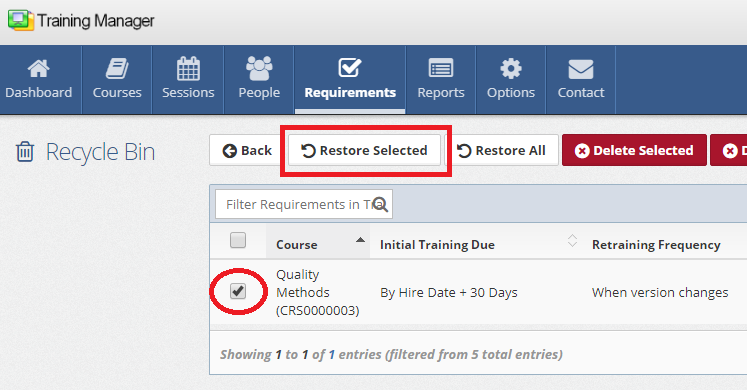
- Sort the requirements as needed by clicking on column headers
- Use course names to identify the correct requirement
- Multiple requirements can be selected for bulk restoration
Bulk Restoration
To restore multiple requirements simultaneously:
- Select multiple requirements by checking boxes next to each requirement
- Click "Restore Selected" to restore all selected requirements at once
This is useful when:
- Multiple related requirements were accidentally deleted
- Recovering from bulk deletion mistakes
Understanding Restoration Impact
On Personnel Compliance
Immediate Effects:
- Personnel compliance status may change from compliant to non-compliant
On Organizational Compliance
Compliance Metrics:
- Overall organizational compliance percentages may change
- Department and location compliance rates update
Regulatory Considerations:
- Restored requirements resume regulatory compliance tracking
- May need to notify regulatory bodies of requirement reinstatement
- Audit preparations should account for requirement gap period
Common Restoration Scenarios
Accidental Deletion Recovery
When requirements are deleted by mistake:
- Restore immediately to minimize disruption
- Communicate the mistake and resolution to stakeholders
Best Practices
After Restoration
Monitoring and Follow-up:
- Track personnel compliance with restored requirements
- Monitor training session demand and capacity
Communication and Documentation:
- Update training documentation and procedures
- Communicate requirement restoration to all stakeholders
- Update requirement management procedures if needed
Related Topics
- Delete Requirements - Understanding the deletion process
- Edit Requirements - Modifying restored requirements
- Add New Requirements - Creating new requirements
- Requirements Management Overview - Complete requirements management guide
Requirement restoration helps maintain compliance continuity and recover from accidental deletions. Always verify restored requirements are functioning properly and update personnel assignments as needed.