Delete Requirements
Learn how to remove training requirements by deleting them to the recycle bin in Training Manager Web Edition.
Overview
When training requirements are no longer needed due to policy changes, organizational restructuring, or regulatory updates, you can delete them to keep your requirement list organized. Deleted requirements are moved to a recycle bin where they can be restored if needed.
Prerequisites
Before deleting requirements, ensure you have:
- Data Administrator or System Administrator permissions
- Confirmation that the requirement should be removed
- Understanding of the impact on personnel assignments and compliance
Important Considerations
Consider before deleting requirements:
- Personnel may currently be assigned to this requirement
- Compliance tracking and reporting will be affected
- The action moves the requirement to recycle bin
Step-by-Step Instructions
1. Locate the Requirement to Delete
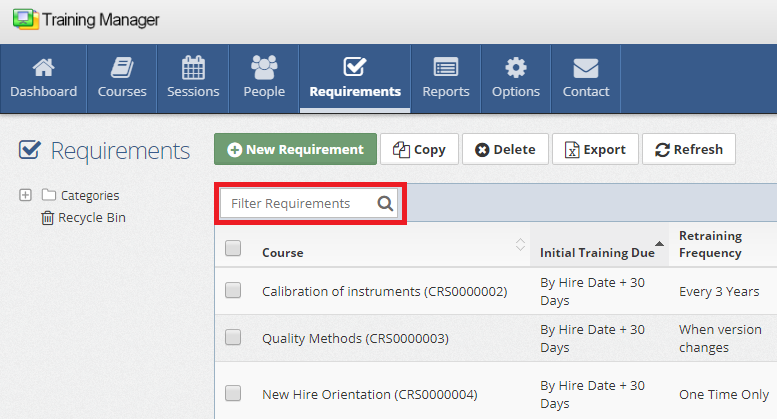
Use the search functionality to find the requirement:
- Navigate to the Requirements List page
- Click in the "Filter Requirements" search box
- Type a few characters of the Course Title associated with the requirement
2. Delete the Requirement
You have two options for deleting a requirement:
Option A: Delete from Requirements List
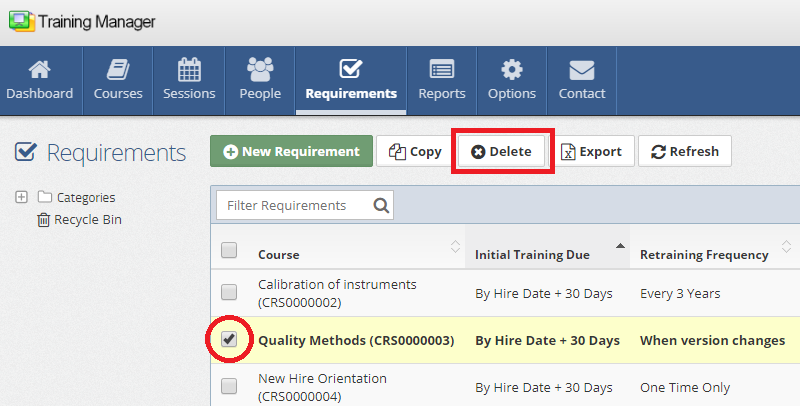
- Select the requirement by placing a checkmark in the box next to the requirement
- Click the "Delete" button in the Requirements List toolbar
Option B: Delete from Requirement Detail Page
- Open the requirement by clicking on the requirement row
- On the Requirement Detail page, click the "Delete" button
3. Confirm Deletion
The system will ask for confirmation before proceeding with the deletion. Confirm that you want to move the requirement to the recycle bin.
Impact of Requirement Deletion
On Personnel Requirements
Current Requirements:
- Personnel currently assigned this requirement will lose the assignment
- Compliance status for this requirement will no longer be tracked
- Training in progress may continue but won't count toward compliance
- Completed training history remains intact
Future Requirements:
- New personnel will not be automatically assigned this requirement
- Existing personnel moving to roles won't receive this assignment
- Requirement will not appear in compliance calculations
On Compliance Reporting
Current Reporting:
- Requirement no longer appears in compliance reports
- Personnel compliance percentages may change
- Dashboard metrics update to reflect requirement removal
Best Practices
Before Deletion
Impact Assessment:
- Review how many personnel are currently assigned
- Check compliance status and completion rates
- Verify no critical compliance needs are compromised
- Consult with compliance officers and training coordinators
Communication Planning:
- Notify affected personnel about requirement removal
- Update training documentation and procedures
- Communicate changes to supervisors and managers
- Plan for any transition or replacement requirements
Documentation:
- Record the reason for requirement deletion
- Document the date and scope of change
- Maintain records for compliance and audit purposes
- Update policy documentation as needed
Handling Special Situations
Regulatory Requirements
For requirements tied to regulations:
- Verify regulatory changes support requirement removal
- Confirm no legal or compliance obligations are violated
- Document regulatory basis for requirement deletion
- Plan for potential regulatory audits or reviews
Accidental Deletion
If you accidentally delete a requirement:
- Act quickly - requirements go to recycle bin, not permanent deletion
- Follow the restore process immediately
- Verify restoration was successful and assignments are restored
- Review deletion procedures to prevent future accidents
Next Steps
After deleting requirements:
- Monitor compliance dashboards for updated metrics
- Review remaining requirement structure for completeness
- Update training schedules based on changed demand
- Communicate changes to all affected stakeholders
Related Topics
- Restore Requirements - Recovering deleted requirements
- Edit Requirements - Modifying requirement settings
- Add New Requirements - Creating replacement requirements
- Compliance Reporting - Monitoring updated compliance
Next: Learn how to restore deleted requirements from the recycle bin.