Approve Training Records
This guide shows administrators how to review and approve user-submitted training records through the Company Dashboard.
Prerequisites
To approve training records, you need:
- System Administrator or Data Administrator permissions
- Access to the Company Dashboard
- The User Submitted Training feature must be enabled
Accessing Pending Approvals
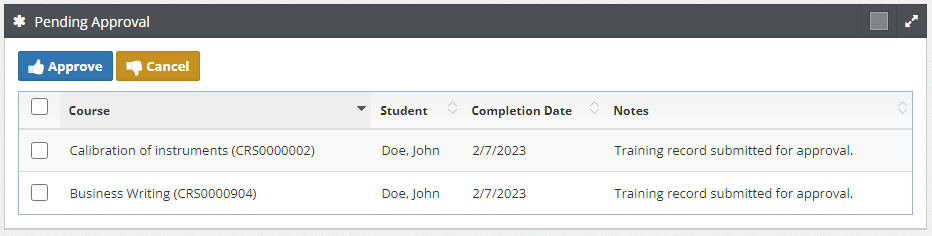
Company Dashboard: Pending Approval List
The Company Dashboard: Pending Approval List enables administrators to review and Approve or Cancel training records that have been submitted by users.
When users submit training records, they appear in the "Pending Approval" section of your Company Dashboard.
Review Process
1. Review Submitted Records
For each pending training record, review:
- Student Information - Who submitted the training
- Course Details - Which course and version was completed
- Completion Date - When the training was allegedly completed
- Notes - Any additional information provided by the user
Hover your mouse over the Student name, or the Course name (to see the Personnel Number or Version number) for verification.
2. Verify Training Completion
Before approving, consider:
- Does the completion date seem reasonable?
- Is the user qualified to take this course?
- Does this training fulfill a specific requirement?
Approval Actions
Training Record Approval
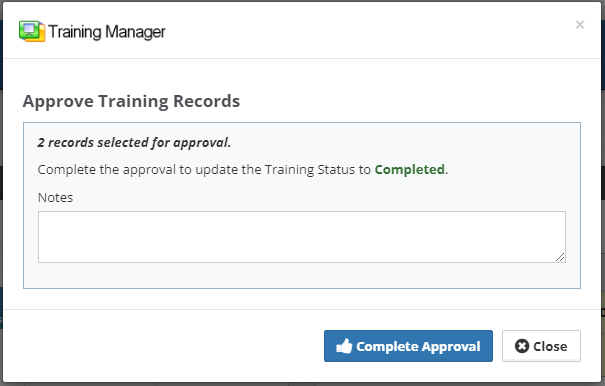
To Approve or Cancel one or more training records:
- Select the record(s) in the list using checkboxes
- Click the "Approve" or "Cancel" button
- All selected records will be processed with the same action
Status Updates
When you process training records:
Approved Records
- Status changes to "Completed"
- Training counts toward fulfilling requirements
- Appears in the user's completed training history
- May trigger compliance updates
Cancelled Records
- Status changes to "Cancelled"
- Training does not count toward requirements
- User can see the cancelled status on their dashboard
Best Practices
Review Guidelines
Establish clear criteria for approving training submissions:
- Required documentation
- Acceptable completion timeframes
- Verification procedures
- Quality standards
Communication
- Provide feedback for cancelled records when possible
- Establish clear timelines for review and approval
- Train users on proper submission procedures
Monitoring
- Regularly check for pending approvals
- Track approval patterns and timing
Troubleshooting
No Pending Approvals Showing?
If you don't see pending training records:
- Verify the User Submitted Training feature is enabled
- Check that users are actually submitting records
- Confirm you have appropriate permissions
- Confirm you have the "Company Dashboard" selected in the upper left
Next Steps
To optimize your approval process:
- Establish Procedures - Create standard operating procedures for reviews
- Train Staff - Ensure all administrators understand the approval process
- Monitor Performance - Track approval times and user satisfaction
- Gather Feedback - Regularly review the process with users and administrators
Related Topics
- Enable User Submitted Training - Initial feature setup
- Submit Training Records - User submission guide
- Company Dashboard - Main approval interface
- Reports - Training analytics and reporting