Restore Courses From Recycle Bin
Learn how to Restore deleted courses from the Recycle Bin in Training Manager Web Edition.
Overview
When courses are deleted, they're moved to a Recycle Bin rather than being permanently deleted. This allows an Administrator to Restore accidentally deleted courses.
Prerequisites
Before restoring courses, ensure you have:
- Data Administrator or System Administrator permissions
- Knowledge of which course needs to be restored
- Confirmation that the course should be returned to active status
Step-by-Step Instructions
1. Access the Recycle Bin
Navigate to the recycle bin from the Course List page:
- Go to the main Course List page
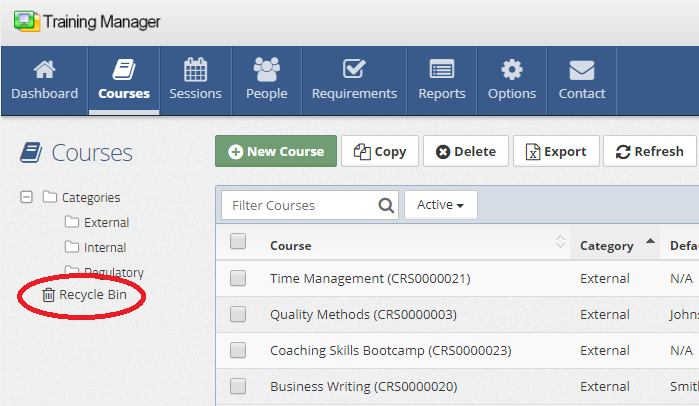
- Look for the "Recycle Bin" link located below the list of folders
- Click the Recycle Bin link
2. Locate the Course to Restore
In the Recycle Bin view:
- Browse the list of deleted courses
- Use the search functionality if needed to find specific courses
- Locate the course you want to restore
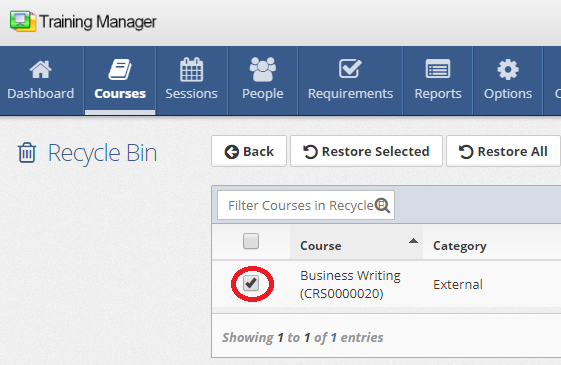
- Check the box next to the course you want to restore
- Click the column headers to sort by title, last updated, etc
- Use course titles or numbers to identify the correct course
- Multiple courses can be selected for bulk restoration
3. Restore the Course
Complete the restoration process:
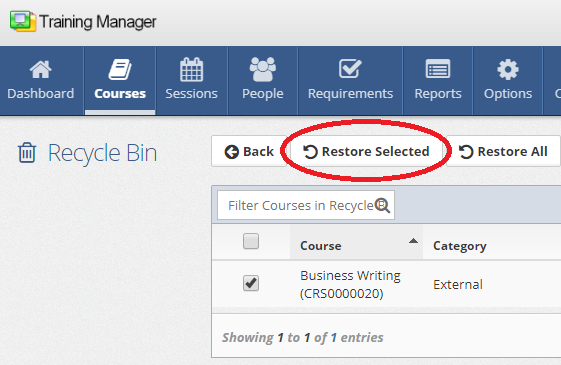
- With the desired course(s) selected, click the "Restore Selected" button
- The system will move the course back to the course list
- Verify the restoration was successful
After Restoration
Once courses are restored:
Verify Records
- Check Course List - Ensure the course appears in the course list
- Check Sessions List - Ensure the related sessions appear in the session list
Understanding the Recycle Bin
What's Stored
The recycle bin contains:
- Recently deleted records
Retention Policy
The system does not automatically delete items from the recycle bin.
- Only a System Administrator can delete records from the recycle bin
- When records are deleted from the recycle bin, they are permanently deleted
Best Practices
Before Restoration
- Verify the correct course - Ensure you're restoring the intended course
During Restoration
- Restore promptly - Don't delay if you know a course was deleted in error
- Verify - Verify the course was restored successfully
After Restoration
- Communicate changes - Notify staff about restored courses
- Review deletion procedures - Prevent future accidental deletions
Troubleshooting
Course Not in Recycle Bin
Possible reasons:
- Course may have been permanently deleted
- Course may not have been deleted (check course list)
- Recycle bin may have been emptied by a System Administrator
- Course may have been renamed and is still in the main course list with a different name
Solutions:
- Check with system administrator about recent permanent deletions
- Verify the course was actually deleted
- Look for similar course names or numbers
- Sort the main list by last updated to find recent changes
Cannot Access Recycle Bin
Possible causes:
- Insufficient user permissions
Solutions:
- Contact system administrator for access
- Verify user role and permissions
- Try refreshing the page or clearing browser cache
Restore Button Not Working
Troubleshooting steps:
- Ensure at least one course is selected
- Verify sufficient permissions
Prevention Strategies
To avoid accidental deletions:
User Training
- Train staff on proper deletion procedures
- Emphasize the difference between deletion and Inactivation
- Establish approval processes for course deletion
System Safeguards
- Confirmation prompts for deletions
- Clear documentation of course management policies
- Limitations on permanent deletions to allow System Administrators to review before final deletion
Related Topics
- Delete Courses - Understanding the deletion process
- Edit Courses - Modifying restored courses
- Add New Courses - Creating replacement courses
- Course Management Overview - Complete course management guide
Course restoration helps maintain data integrity and recover from accidental deletions. Always verify restored courses are functioning properly before resuming normal operations.